Alternative Analysis
The Alternative Module allows users to evaluate different risk reduction options—such as improved building materials, land-use planning, or protective infrastructure. These alternatives help decision-makers understand how certain measures may reduce risk in the future.
Alternatives are linked to the Exposure, Loss, and Risk modules to recalculate risk levels assuming a selected alternative is implemented.
Create Alternatives
To begin using the Alternative module:
Open Project Settings - Go to the Project Dashboard. - Select your project and click Settings (gear icon).
Add an Alternative - Go to the Alternatives tab. - Click Add Alternatives.
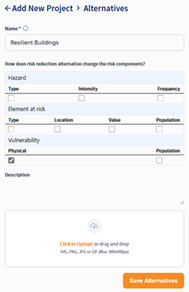
Create alternative settings
Fill in the Details - Alternative Name: Choose a name that reflects the mitigation strategy (e.g., “Reinforced Roofs”, “Flood Barrier”, etc.). - Affected Risk Component(s): Select the component(s) that change due to the alternative (e.g., Hazard, EaR, Vulnerability). - Description (optional): Add a brief explanation. - Upload Files (optional): Attach related documents (e.g., design files, reports, or planning documents).

Fill in alternative details
Save the Alternative
The new alternative will appear in the Alternatives Table and will be available for selection during data uploads (Hazard or EaR layers).
Upload Data Representing Alternatives
When uploading Hazard or Elements-at-Risk datasets that represent an alternative, you must:
Follow the standard upload process (see Upload Hazard and EAR).
Select the appropriate Alternative from the dropdown during upload.
This ensures the uploaded dataset is associated with the defined risk reduction strategy.
> For Vulnerability, you do not need to define an alternative. Instead, assign an updated vulnerability curve that reflects the effect of the alternative (e.g., lower vulnerability for reinforced structures).
Calculate Exposure, Loss, and Risk for Alternatives
Once you’ve uploaded the alternative-specific data, you can calculate exposure, loss, and risk as usual.
Repeat the procedures from: - Calculate Exposure for exposure calculation. - Loss Calculation for loss calculation. - Risk calculation can also be performed based on the new loss layer.
Important Tips: - Always ensure the correct Alternative Name is selected when uploading data. - Changes in hazard, EAR, or vulnerability must be properly reflected in the uploaded dataset to ensure accurate results. - You can compare different alternatives using spatial outputs, or in later steps apply:
Cost-Benefit Analysis
Cost-Effectiveness Analysis
Spatial Multi-Criteria Evaluation (SMCE)
These methods help in identifying the optimal risk reduction alternative for implementation.